Meta description: Learn how to make a practical social media content calendar in 7 easy steps — templates, posting cadence, and workflow tips.
Suggested length: 400–550 words
Intro
Posting without a calendar is like driving without a map. A content calendar organizes ideas, keeps your brand consistent, and saves time. Here’s how to make one in 7 steps.
Step 1 — Decide frequency & platforms
Pick a realistic cadence: e.g., Instagram 4x/week, LinkedIn 3x/week, TikTok 2x/week. Consistency beats quantity.
Step 2 — Define content pillars
Choose 3–5 pillars: Educational, Promotional, Social Proof, Behind-the-Scenes, Community. These guide theme selection.
Step 3 — Collect ideas
Brainstorm topics, repurpose blog posts, use FAQs, customer testimonials, industry news, or trending sounds/challenges.
Step 4 — Use a simple template
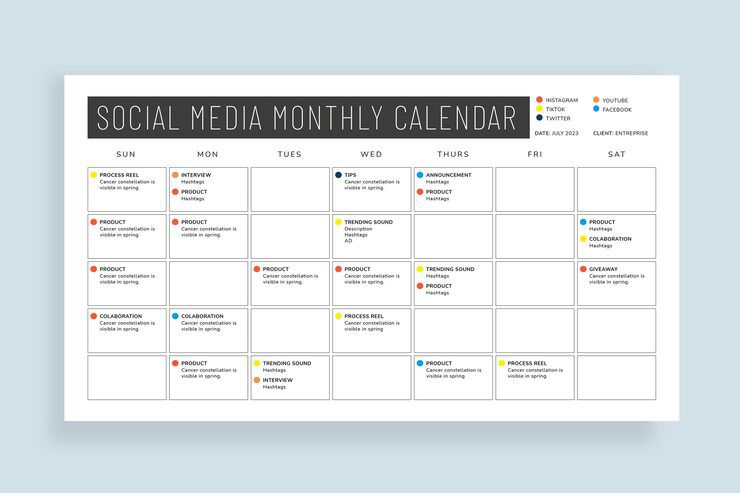
Columns: Date | Platform | Post Copy | Visual Brief | Hashtags | CTA | Status. Google Sheets, Notion, or Airtable work great.
Step 5 — Batch create content
Create visuals and captions in one session. Use scheduling tools (Meta Business Suite, Buffer) for automation.
Step 6 — Plan promotional cycles
Map product launches and promotions 4–6 weeks in advance. Add reminder posts and retargeting ad windows.
Step 7 — Review and adapt
Analyze top posts monthly and rework calendar based on performance.
Template example (weekly):
• Mon: Educational carousel (pillar: education)
• Wed: Client testimonial reel (social proof)
• Fri: Product highlight + CTA (promotion)
• Sun: Poll or stories (engagement)